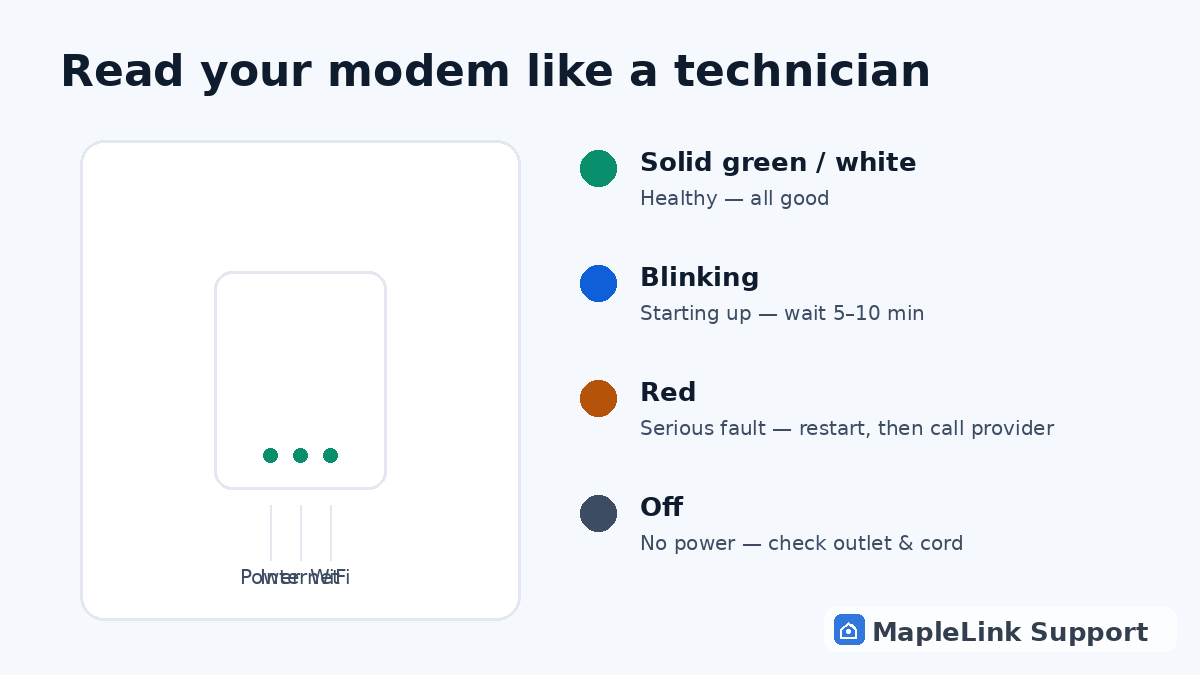
Flashing or blinking white light? Start here
This is the question we hear most: your internet box has a flashing white or green light and nothing works. In plain terms, a flashing light means the box is trying to connect — it hasn't given up, it just hasn't finished. Give it 10 minutes. If it's still flashing after a proper restart (60 seconds unplugged, 5 minutes to settle), the box can't reach your provider's network — that's usually a line issue or a failing unit, and no amount of button-pressing at home will fix it. That's the moment to check for an outage, or have a technician test the line.
Quick answers
What does a solid green light on my TELUS box mean?
Healthy — connected to the network and working. If internet still fails with green lights, look at WiFi or devices instead.
Why is my TELUS modem light blinking?
It's starting up or reconnecting. Give it up to 5–10 minutes. Blinking that never stops means it can't reach the network — restart, then check for an outage.
What does a red light on my TELUS modem mean?
A serious connection fault. One proper restart is worth trying; after that, the fix is on your provider's side or the box is dying.
Why is the internet symbol flashing on my TELUS modem?
A flashing internet symbol means the modem is still trying to connect to the network — this is normal for up to 10 minutes after a restart. If it never stops flashing, the modem can't reach your provider's network: check for an outage, then restart it properly (60 seconds unplugged). Still flashing after that? It's a line or hardware issue.
Flashing white light on TELUS modem — what does it mean?
On most TELUS boxes, a flashing white light means 'connecting.' Wait up to 10 minutes. If it keeps flashing, do a full restart: unplug for 60 seconds, plug back in, wait 5 minutes. A white light that never goes solid usually means the box can't reach the network — a provider-side line problem or a failing modem.
Why is my TELUS modem light yellow or flashing green?
A yellow or amber light on most TELUS boxes means the modem is connecting but hasn't finished — give it 10 minutes after a restart. Flashing green is the same story: still negotiating with the network. If either never goes solid white/green after a proper 60-second restart, the modem can't reach the network — check for an outage, then it's a line or hardware call.
My TELUS modem has a solid red light — what now?
A solid red light is the serious one: the modem has a fault and no connection. Try one proper restart (60 seconds unplugged, 5 minutes to settle). If it's red again, that's a provider-side line issue or a dying unit — call your provider with the light colour noted, or have a technician test the line and document it for you.
Do the same light meanings apply to a TELUS router?
Yes — whether your white box is called a modem, a router, a gateway, or a WiFi hub, the lights mean the same things: solid white/green is healthy, flashing means still connecting (give it 10 minutes), red or no light means a fault, and a light that's off means no power to that function. The fix steps in this guide work identically on any of them.
Why do I keep having internet connectivity issues?
Recurring connectivity issues almost always trace to one of four causes: an overheating modem (hot to the touch, or stuffed in a cabinet), weak WiFi where you actually use your devices, evening neighbourhood congestion, or a line fault your provider needs to fix. The fastest way to find yours: run the 60-second diagnostic — it isolates which of the four you have, then gives you the exact fix path.
TELUS T3200M orange internet light — what does it mean?
On the older Actiontec T3200M, an orange internet light means the same thing a blinking light means on newer hubs: it's negotiating a connection and hasn't finished — give it 10 minutes after any restart. If it stays orange, the modem can't authenticate with TELUS's network: restart it properly (60 seconds unplugged), then check TELUS's outage page. Persistent orange after a good restart is a line fault or an aging unit — the T3200M is an older model many customers are upgrading away from, so if yours keeps failing, ask TELUS about a replacement.
TELUS Network Access Hub flashing green — what does it mean?
The Network Access Hub (NAH) is the fibre terminal TELUS installs for PureFibre homes — the small box where the fibre line enters your house. A flashing green light on the NAH means the fibre terminal is still syncing with the network: normal for up to 10 minutes after any restart or power blip. If it never goes solid, the issue is the fibre line or the NAH itself — that's TELUS's equipment and their repair, and a blinking NAH after a power outage usually resolves itself within the hour.